
Do you hate Fairfax’s horrible auto-playing videos? How about their retina-searing flash ads and giant fluorescent ad-wrap-arounds? Well, worry not!
First, download Adblock/Adblock Plus:
Firefox: https://addons.mozilla.org/en-US/firefox/addon/adblock-plus/
Chrome: https://chrome.google.com/extensions/detail/gighmmpiobklfepjocnamgkkbiglidom
Use the EasyList filter (this kills all the ads). Now, add the following custom filters:
(In Firefox: Tools -> AdBlock Plus Preferences -> Add Filter…)
com.au##DIV.videoWrap

com.au##.overlay.overlayPlayCountdown.overlayPrePlay.visible

com.au###video-player-content
It should look like this:
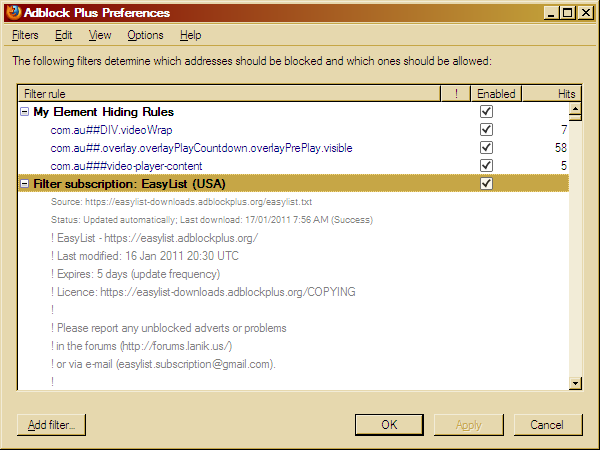
Hooray! No more stupid freaking horrible autoplay videos and ugly ads! Win!
but dude – what if I’m a sucker and still use IE?
Aw, you should get Chrome! And if it’s a work thing, pester them to install Chrome. They have no excuse any more, really: http://googleenterprise.blogspot.com/2010/12/chrome-is-ready-for-business.html